About Bubble Word Jam

The First Few Minutes Are a Test of Patience
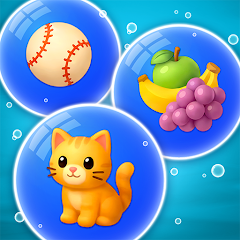
Opening Bubble Word Jam for the first time feels like stepping into a quiet classroom. The board is clean, the bubbles are colorful, and the goal seems simple: match words to their categories. But the game does not hold your hand. The first level throws a mix of random words like "apple," "red," and "fruit" at you, and you are expected to figure out that they all belong to the "food" group. That initial confusion is part of the design. The game wants you to think. It wants you to pause, scan, and make connections. This is not a mindless swiping game. Each move requires a moment of logic. The bubbles float gently, and tapping one highlights it. Tapping another that belongs to the same category creates a satisfying pop sound. The board clears a little. The pressure builds as the timer ticks down. You start to see patterns. By level three, you are grouping colors, animals, and shapes without hesitation. The game has already trained your brain to look for relationships. That is the core loop: identify, match, clear, repeat. It is simple, but the execution is polished. The controls respond instantly, and the visual feedback—bubbles bursting, score increments—keeps you engaged. The offline mode is a lifesaver for commuters or anyone in a spotty network area. You can play without wifi, which is a rare perk in today's connected world. The game does not spam you with prompts to connect to the internet. It just works. That quiet reliability is what makes the first few minutes feel less like a tutorial and more like a genuine puzzle experience.
The Booster System Creates a Real Trade-Off
Bubble Word Jam offers three boosters: the magnifying glass, the magnet, and the add bubble. The magnifying glass reveals hidden category connections, which is useful when you are stuck on a tricky level. The magnet automatically pulls matching bubbles together, saving you time and clicks. The add bubble gives you extra space on the board, which can prevent a game-over situation. On paper, these sound like simple helpers. In practice, they change how you approach each level. Using the magnifying glass early can expose the entire category structure, allowing you to plan your moves strategically. Then, deploying the magnet to clear those identified groups in one go can clear half the board in seconds. This two-step combo is not explained anywhere in the game's tutorial. It is something you discover through trial and error. The trade-off is that boosters are limited. You earn them through level progression or by watching ads. So you cannot rely on them every time. You have to decide: do you use the magnifying glass now to save time, or do you save it for a harder level later? That decision-making adds a layer of depth that is not apparent from the Play Store description. Players who figure out this combo early tend to advance faster. Those who hoard their boosters often get stuck on the same level for days, frustrated by the sudden difficulty spike. This is a common complaint in user discussions. The game does not punish you for using boosters, but it does not reward you for saving them either. It is a neutral system that leaves the choice entirely to the player.
The Difficulty Curve Is Not a Straight Line
Levels 1 through 20 are gentle. They introduce basic categories like colors, numbers, and shapes. The words are common, and the groupings are obvious. By level 30, the game starts mixing abstract categories like "emotions" and "actions." The words become less concrete. You might see "happy," "sad," and "angry" and need to group them under "feelings." That is manageable. But by level 50, the game throws in red herrings—words that seem to belong to one category but actually fit another. For example, "bark" could be a tree part or a dog sound. The game expects you to choose the correct context based on the other words on the board. This is where the complaints about difficulty spikes come from. Players report hitting a wall around level 45 where the categories become too ambiguous. The game does not offer hints or skip options. You either figure it out or you lose. This abrupt jump in challenge is a common frustration. The changelog mentions "bug fixes and game improvements," but it does not address the difficulty balancing. Some users have called this a design flaw. Others see it as a feature that separates casual players from dedicated puzzle solvers. The reality is that the game's difficulty curve is not a smooth slope. It is a series of plateaus and cliffs. You breeze through ten levels, then suddenly spend twenty minutes on a single board. That unpredictability keeps you engaged, but it also leads to uninstalls. The game does not care if you quit. It just presents the next level and waits.
The Ads Are Aggressive but Avoidable
Bubble Word Jam is free, which means ads are part of the package. A video ad plays after every third level. A banner ad sits at the bottom of the screen during gameplay. Occasionally, an ad pops up when you open the app. These interruptions are annoying, but they are not constant. You can play for ten minutes without seeing an ad, then suddenly get three in a row. The timing feels random, which adds to the frustration. However, there is a workaround. The game offers a "remove ads" purchase for a small fee. It is a one-time payment that permanently disables all ads. This is a common monetization strategy, and it works. Players who pay never see another ad. Those who do not pay have to tolerate the interruptions. The game does not force you to watch ads to continue playing. You can always decline and keep playing, though the option to watch an ad for a free booster is always there. This creates a clear divide between free players and paying players. Free players grind through levels and watch ads for boosters. Paying players breeze through with unlimited boosters and no interruptions. The game does not hide this reality. It is upfront about the cost and the benefit. This honesty is refreshing compared to games that hide their paywalls behind confusing menus. The ad system is aggressive but not predatory. It gives you a choice, and that choice is clearly communicated.
Screenshots


Get File
App Specifications
| Latest Version | 1.2.0 |
| Uploaded by | Lion Studios Plus |
| Requires Android | Android 7.0+ |
| Category | Word |
| Content Rating | Rated for 3+ |
Technical Details
| Package Name | com.AppFore.BubbleWordJam |
| Languages | English |
| Architecture | arm64-v8a |
| Signature | 47c81bce923ef76bc4b787ae4ef638d3c24c19e538b021c8235f232f1c6505ef |
Security & Additional Info
| Scan Result | Secure |
| Package Name | com.AppFore.BubbleWordJam |
| SHA‑256 | 47c81bce923ef76bc4b787ae4ef638d3c24c19e538b021c8235f232f1c6505ef |
| SHA‑1 | 7bf372a06efc70bed0ccda8670fc24127799b4c4 |
| App Permissions | 0 |