About Canfield Solitaire - Cards

The First Deal: What Happens When You Open Canfield Solitaire - Cards
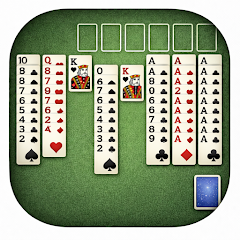
Opening the app drops you straight into a game. No splash screen, no tutorial pop-up, just a shuffled deck and a reserve pile of 13 cards already laid out. The top card of that reserve sits face up, and four tableau columns wait below. The foundation pile sits empty, but the game already knows the starting rank — the first card you play decides it. That immediate jump into play is the whole point. No account creation, no registration wall, no "sign in to continue" prompt. You tap the icon, and the cards are there. The layout fits both phones and tablets without needing to adjust anything. Portrait mode works. Landscape works. The screen real estate shifts, but the cards stay readable. That matters because Canfield is not a game you play casually for two minutes. A single round can stretch past ten minutes, and the game tracks every move, every win, every loss.
The initial deal follows the classic Canfield structure. Thirteen cards go to the reserve, with only the top one exposed. Four cards start the tableau, and the remaining deck sits in the stock pile. The foundation starts from whatever rank lands on it first — a king one round, a three the next. That variability changes everything. One deal might give you a low starting rank, making it easier to build up. Another starts high, forcing you to work the tableau harder before you can even place a card on the foundation. The app handles all that setup in under a second. No loading bar, no waiting. The cards snap into place, and the timer starts counting your moves. The statistics panel — accessible from the main screen — logs every session: games played, games won, best time, fewest moves. That data persists across sessions. Close the app, open it a week later, and the numbers are still there.
Undo vs. Odds: Where Strategy Meets the 8% Wall
The undo button sits in the corner, always available, always unlimited. Tap it once, and your last move reverses. Tap it ten times, and the game rewinds ten moves. No penalty. No limit. That sounds like a safety net, but Canfield's win rate hovers around 8% even with perfect play. The undo feature does not change the odds — it changes how you approach the game. Instead of living with a mistake, you can test a sequence, see where it leads, and rewind if it dead-ends. That creates a gameplay loop that differs from physical cards. With a real deck, you commit to every move. Here, you can experiment. Play a card to the tableau, see if it opens a useful sequence, undo if it does not. The app remembers every card position, every move, every state. The undo function works flawlessly — no lag, no stutter, no limit on how far back you can go.
That interaction between undo and the low win rate changes the game's difficulty. On paper, Canfield is one of the hardest solitaire variants. The reserve pile gives you 13 extra cards, but those cards are not freely available — you can only play the top card of the reserve at any time. The tableau builds down in alternating colors, and you can move entire sequences, but only if they are already in order. The foundation wraps from king to ace, so a king can go on a queen, and an ace can go on a king. That cyclic rule adds another layer of complexity. With undo, you can brute-force your way through combinations, trying every possible sequence until you find one that works. That does not guarantee a win — the game still requires luck in the deal — but it shifts the experience from pure chance to puzzle-solving. You are not just playing cards; you are solving a branching logic problem where every move has multiple consequences.
What Actually Happens During Play: Ads, Crashes, and Touch Response
The game runs entirely offline. No internet connection required. That means no server-side validation, no account sync, no cloud saves. Everything stays local on your device. The trade-off is that ads appear between rounds, not during them. Finish a game, and a full-screen ad shows up before the next deal. There is no option to pay to remove them — the app is free, and that is the monetization model. Some users report that ads persist even after giving high ratings, and others mention that the ad frequency feels high. The ads are standard video or static banners, nothing intrusive during active play. The game itself remains ad-free while you are moving cards.
Touch response varies. The app uses drag-and-drop for moving cards, but some users report that the game does not always register taps accurately. Moving a card to an empty tableau space sometimes fails on the first try. The app requires a precise tap on the card and a precise drop on the target area. On smaller screens, that can be finicky. The game does not offer a left-handed mode, so if you hold the phone in your right hand, your thumb may obscure the tableau when you reach across. The cards themselves are clear and readable, with optional card backs and table colors available in the settings. The animations are smooth — no jitter, no frame drops. The game runs on older Android devices without issue, according to user reports. Crashes are rare, though some versions have had display cutoff issues on certain screen resolutions. The developer pushes updates periodically, but the changelog does not specify what each update fixes.
The Data Safety Section and What It Actually Says
The Play Store listing includes a data safety section. The app shares device IDs or other identifiers with third parties. It collects app activity, app information, and device IDs. Data is encrypted in transit, but users cannot request data deletion. That is the entire privacy policy in a nutshell. No lengthy terms of service, no complicated opt-out menus. The developer, based in France, lists an email address for support. The app does not request any special permissions — no location, no contacts, no storage access beyond what the game needs to run. That minimal permission set stands out. Many card games ask for storage access to save data or photos. This one does not. The game saves its statistics locally without needing external storage permissions. That keeps the app lightweight and reduces the attack surface for privacy concerns. The app size, recorded internally, stays under 30 MB, making it a quick download even on slower connections.
Screenshots


Get File
App Specifications
| Latest Version | 1.24.0 |
| Uploaded by | sbkr apps |
| Requires Android | Android 7.0+ |
| Category | Card |
| Content Rating | Rated for 3+ |
Technical Details
| Package Name | sb.cards.canfield |
| Languages | supported |
| Architecture | arm64-v8a |
| Signature | ad14354feb6c23d97b587a9b0b9f5dce69a11dbe6957b76bf44afaea1d7cada9 |
Security & Additional Info
| Scan Result | Secure |
| Package Name | sb.cards.canfield |
| SHA‑256 | ad14354feb6c23d97b587a9b0b9f5dce69a11dbe6957b76bf44afaea1d7cada9 |
| SHA‑1 | 7822b1d1cf03003777e2e06c16313407f41d9153 |
| App Permissions | 0 |