About FreeCell

Opening the Game for the First Time
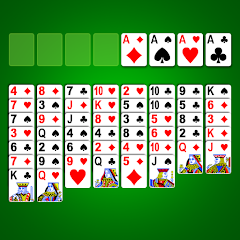
Tap the FreeCell icon and the screen fills with a standard 52-card deck arranged in eight columns. Four empty cells sit at the top left, four foundation piles at the top right. The game does not ask for a tutorial, does not force a login, and does not demand any permissions right away. It just deals the cards and waits. That immediate start is what many players appreciate — no onboarding funnel, no account creation, just the board and the clock.
The cards are all face-up from the beginning, which is the core difference between FreeCell and most other solitaire variants. Every card is visible, every move is a decision based on complete information. There is no luck in the draw because there is no draw pile. The only randomness is in the initial deal, and even that is constrained — almost every deal is winnable if you play correctly. Players who have spent years on the PC version of FreeCell will recognize the layout immediately. The Android version from KARMAN Games keeps the same structure but adds touch controls that change how you interact with the board.
Single tap moves a card to the next available position if the rules allow it. Drag and drop also works, but the single-tap option is faster for experienced players. The app highlights low cards automatically, which helps newer players spot moves they might otherwise miss. Within seconds of opening, you are already moving cards around, testing the limits of the four free cells.
When Auto-Complete Meets Speed Control
The auto-complete feature is one of the most useful tools in this version. When you have a sequence of cards that can legally move to the foundation piles — for example, an Ace, then a Two, then a Three of the same suit — auto-complete will move them all up with one tap. This saves a huge amount of time, especially in the mid-game when multiple foundations are building simultaneously. The game speed control, on the other hand, lets you adjust how fast the animations play out. Set it to fast and cards fly to their destinations. Set it to slow and you can watch every single movement in detail.
These two features interact in a way that is not obvious from the Play Store description. When auto-complete runs at high speed, the game moves cards to foundations so quickly that you can lose track of which cards just went up. This matters because FreeCell is a game of perfect information — you need to know exactly what is in each foundation to plan your next moves. If you are not paying close attention, auto-complete at high speed can move a card you were saving for a different purpose. The game does not warn you or ask for confirmation. It just moves the card. For players who rely on the speed control to get through games faster, this creates a tension between efficiency and strategic awareness. The only workaround is to slow the speed down during critical moments, which defeats the purpose of having a speed control in the first place.
This interaction is not a bug. It is a design choice that prioritizes convenience over control. Some players will love it because it removes friction. Others will find it frustrating because it removes agency. The app does not offer an option to disable auto-complete entirely, so you have to learn to work around it. One practical approach is to manually move cards to foundations until the late game, then let auto-complete finish the rest. That way, you retain control over the critical early and mid-game decisions while still benefiting from the time-saving feature at the end.
Ads, Popups, and the Real Cost of Free
The free version of FreeCell displays banner ads at the bottom of the screen. Many players report that these ads are not intrusive — they sit quietly at the bottom and do not interrupt gameplay. The problem comes from the interstitial ads that appear between games. Some users have reported 30-second ads after every game or two, which can break the flow of play. The most persistent complaint is the 'no more moves' popup. This appears when the game detects that no legal moves remain on the board. The popup interrupts the round and cannot be turned off. Worse, some users say the popup is inaccurate — it appears even when there are still valid moves available.
Bugs have also been reported across multiple versions. One recurring issue involves cards loading with blank faces. Rebooting the device does not fix it. The only solution is to uninstall and reinstall the app, which wipes all progress and statistics. Another bug causes the game to freeze when the start menu appears, with the 'New Game' button doing nothing. These issues are not universal, but they appear consistently enough in user reviews and forum discussions to be considered real problems with the current build. The developer has not published detailed changelogs beyond 'full screen support' for version 1.25, so it is unclear whether these bugs are being addressed.
The app requests permissions related to location, personal information, and other data types. These are not required for the core gameplay — FreeCell works perfectly offline without any of these permissions. The data collection appears to be tied to advertising and analytics, which is typical for free mobile games. If you want to avoid the ads entirely, the Google Play Pass subscription removes them and also unlocks other games from the developer. For players who prefer a completely ad-free experience without a subscription, the iOS version offers a one-time purchase option, but that is not available on Android.
Storage, Permissions, and Device Compatibility
The app requires Android 6.0 or higher. It takes up approximately 14.6 MB of storage space, which is modest compared to many modern games. The architecture supports arm64-v8a, armeabi-v7a, and x86, so it works on most Android devices released in the last several years. The app does not request storage permission to read or write files, which means it does not access your photos, documents, or other personal files. It does request internet access, which is used for ads and analytics. The full screen support added in version 1.25 means the game now scales properly on devices with taller displays, eliminating the black bars that appeared in earlier versions.
Screenshots


Get File
App Specifications
| Latest Version | 1.25 |
| Uploaded by | KARMAN Games (CY) LTD |
| Requires Android | Android 6.0+ |
| Category | Card |
| Content Rating | Rated for 16+ |
Technical Details
| Package Name | com.karmangames.freecell |
| Languages | English |
| Architecture | arm64-v8a |
| Signature | 7ef8e496ffb7de2f886e241d68a8ceff8490db1263e8cbc103d334a7085381b9 |
Security & Additional Info
| Scan Result | Secure |
| Package Name | com.karmangames.freecell |
| SHA‑256 | 7ef8e496ffb7de2f886e241d68a8ceff8490db1263e8cbc103d334a7085381b9 |
| SHA‑1 | 8b6849e8eeb45a82186a05d799e9e8f02f1031dc |
| App Permissions | 0 |