About Obby bike: Parkour Adventure

The Onboarding Reality
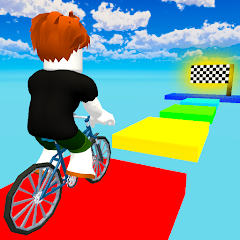
Opening Obby bike: Parkour Adventure for the first time presents a straightforward main menu. Play, Settings, and a shop icon. No tutorial video plays. No onboarding walkthrough appears. The game drops you directly into the first level after tapping "Play." The controls are simple: a left button, a right button, and a jump button. No explanation of the physics. No guidance on how to balance the bike. The game assumes you already know how to play an obby game. This is a stark contrast to many racing games that offer a practice mode or a tutorial race. The first level is forgiving, with wide platforms and simple gaps. But the lack of instruction means new players might not understand the importance of speed boosts or how to use the checkpoint system effectively. The interface is clean but sparse. No minimap. No timer visible during the race. The only feedback is the visual of your bike moving through the course. The game does not ask for any permissions upfront. No location. No storage. No contacts. The only request is for internet access, likely for ads. This streamlined approach reduces friction but also leaves new players without any guidance on advanced mechanics like using bonuses or navigating disappearing platforms.
When Checkpoints Meet Boost Bonuses
The app offers two core mechanics that seem straightforward on their own: a checkpoint system that lets you restart from the last checkpoint after falling, and boost bonuses that provide temporary speed or obstacle-clearing advantages. The Play Store description presents them as separate bullet points. But in practice, they interact in a way that is not obvious until you use them together. The checkpoint system is generous. Fall off a platform, and you respawn at the last checkpoint with no penalty. This encourages risk-taking. You can attempt difficult jumps without fear of losing progress. The boost bonuses, however, are scarce. They appear at specific points in the level. Using a boost to skip a tricky section might save time, but if you fall after using it, you respawn at the checkpoint without the boost. The boost is consumed. This creates a strategic trade-off. Do you use the boost to get ahead, or save it for a particularly difficult obstacle? The game does not explain this. It does not warn you that boosts are one-time use. A player might waste a boost on an easy section, only to struggle later. This interaction between the checkpoint system and the boost bonuses is a practical limitation that emerges only when you try to use both features in a real run.
Performance, Lag, and the Frame Rate Cap
The game generally performs well on modern devices. The 3D graphics are colorful, and the bike physics feel responsive. However, performance is not without its issues. A common complaint is lag. One reviewer noted: "I am giving 4.5 star bcz this is laggy which affect on the gameplay and over all experiences." Another user asked the developer to "take the frame limit cap a little bit higher." This suggests the game has a built-in frame rate cap that may be too low for some devices, causing stuttering. The game also contains ads. These are displayed between levels and sometimes after deaths. The ads can be intrusive, interrupting the flow of the game. There is an option to remove ads via in-app purchase, but the cost is not specified in the Play Store description. The game's performance on older devices is a concern. The minimum Android version required is 7.0, but the lag complaints suggest that even some newer devices may experience issues. The game does not appear to have any major crashing issues, based on available reports. The overall stability is acceptable, but the occasional lag and the frame rate cap detract from the otherwise smooth experience.
Permissions, Privacy, and Data Handling
The app requests a range of permissions. The Play Store data safety section states that the app may share location, personal info, and other data with third parties. The app collects location, personal info, and four other data types. Data is not encrypted. Data cannot be deleted. This is a concerning privacy profile. The developer, Kids Games LLC, is based in North Miami Beach, Florida. The privacy policy is not explicitly linked in the Play Store listing, but the developer's contact information is provided. The app does not request any permissions during the initial launch, but it may request location access later. The lack of encryption and the inability to delete data are significant drawbacks for privacy-conscious users. The app's business model relies on ads and in-app purchases. The intrusive ads and the costly in-app purchases are a common source of complaints. The app's data handling practices are transparent in terms of what is collected, but the purpose of each data point is not clearly explained within the app. This lack of granularity in privacy controls is a limitation for users who want more control over their data.
Screenshots


Get File
App Specifications
| Latest Version | 1.35.2 |
| Uploaded by | Kids Games LLC |
| Requires Android | Android 7.0+ |
| Category | Racing |
| Content Rating | Rated for 3+ |
Technical Details
| Package Name | com.GingerPlay.Obbyonabike |
| Languages | English |
| Architecture | arm64-v8a |
| Signature | 9e2c4828bb5043b3b3e1c18843b6beaf34ef6567f6b9a24a6db0e3d3b9df4936 |
Security & Additional Info
| Scan Result | Secure |
| Package Name | com.GingerPlay.Obbyonabike |
| SHA‑256 | 9e2c4828bb5043b3b3e1c18843b6beaf34ef6567f6b9a24a6db0e3d3b9df4936 |
| SHA‑1 | d672493012c6e8364390c833fe4dad48a1db5b0c |
| App Permissions | 0 |