About Quiz Flag - Guess the Country

Opening the App – The First Flag
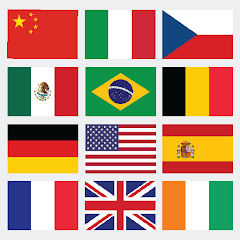
Tap the icon, and you land directly on a flag. No splash screen. No tutorial. No sign-up. A flag fills the centre of the screen, and four country names sit below it. The app expects you to know what to do: pick the correct country. The first few flags are easy — France, USA, Brazil — but the difficulty ramps up quickly. You answer correctly, and the next flag appears. Answer incorrectly, and the app shows you the right answer. You earn points for correct answers, and a progress bar fills. This is the core loop: see the flag, pick the country, learn from mistakes. The app does not explain the competition mode or the offline feature. You discover those as you play. For some, this is liberating. For others, it is confusing. The first few minutes are spent figuring out that you can play without an internet connection and that you can compete with players worldwide. The app does not advertise these features prominently, which is a missed opportunity.
The interface is clean but basic. The main screen shows the flag, the answer options, a score counter, and a settings gear. The colour palette is simple — whites, blues, and greys — evoking a straightforward quiz feel. There is no background music, only the occasional sound effect when you answer correctly. This silence is intentional. The app wants you to focus on the flag, not on distractions. The text is in English by default, and the app does not offer language options. This is a limitation for non-English speakers, but it also reinforces the app's identity as a global quiz for English-speaking audiences.
The level progression is straightforward. You start with a random flag. Each correct answer adds to your score. There is no fixed number of questions per round; you can keep playing as long as you want. The difficulty increases gradually — from well-known flags to obscure ones. The app does not warn you about the jump in difficulty. You simply move to the next flag and discover that it is harder than the last. This trial-and-error approach works for patient players but frustrates those who prefer clear difficulty indicators. The app also does not show you which flags you have mastered, which reduces the sense of accomplishment. A simple progress tracker would significantly enhance the experience.
Offline Play and Ads – A Balancing Act
The offline gameplay feature is the app's defining strength. You can play without an internet connection, making it ideal for long trips or areas with poor connectivity. This is a rare feature in mobile quiz games, and it sets the app apart from competitors. However, the offline mode comes with a trade-off: ads. The app is ad-supported, and ads appear between questions. This can be jarring. You answer a question correctly, and an ad pops up. You start the next question, and another ad plays. The frequency of ads can make the game feel like an ad delivery platform with a quiz attached. The developer's changelog mentions "improved ad reliability," suggesting that the ad system has been a point of focus. This is a double-edged sword. The ads fund the app, but they also interrupt the flow. For users who value uninterrupted gameplay, this is a significant drawback. The app does not offer an ad-free version or a way to remove ads through a one-time purchase, which is a missed opportunity.
The competition mode adds another layer. You compete with players from around the world, answering flags as fast as possible. This mode requires an internet connection, which contradicts the offline promise. The app does not explain this distinction. You discover it when you try to access the competition mode offline and it fails. This is a point of confusion. The app also does not track your competition stats — wins, losses, or streaks. This reduces the incentive to keep playing. A simple leaderboard for competition mode would significantly enhance the competitive aspect.
The learn-while-you-play approach is the app's core value proposition. Each flag you identify teaches you the country and its capital. This is a valuable educational tool, especially for students or geography enthusiasts. However, the app does not offer any structured learning path. You are thrown into random flags without any context. A category-based approach — by continent or difficulty level — would make the learning more effective. The app also does not provide any additional information about the countries, such as population or culture. This is a missed opportunity to deepen the educational value. The app positions itself as a learning tool, but it is really just a quiz game with educational benefits.
Real‑World Performance – Ads, Bugs, and Smooth Sailing
The app runs smoothly on most Android devices. There are no noticeable lags or crashes during gameplay, even with the competition mode. The 39.7 MB size is small, and the app does not consume excessive storage. The data safety section on the Play Store states that the app shares device or other IDs with third parties. This is a privacy concern. The app does not display a privacy policy on the Play Store page, which is a compliance issue. Users should be cautious about granting permissions. The app is free, but the data collection may be the price of entry.
Bugs are rare but not non-existent. The changelog mentions "fixed notifications" and "improved ad reliability," suggesting that the app has had issues with notifications and ads in the past. The most common issues appear to be related to ad loading and notification delivery. The app does not provide any troubleshooting guidance. If an ad fails to load or a notification does not appear, there is no way to report the issue. You have to restart the app. This can be frustrating, especially during a competition. The developer has addressed these issues in the changelog, but they may still be present. Users should be prepared for occasional glitches.
The app's offline capability is a major strength. Once downloaded, the game works without an internet connection. This is ideal for users in areas with poor connectivity or for those who want to play without using mobile data. The offline mode means that all flags are stored locally. The trade-off is that updates require a full re-download of the APK, which can be cumbersome. The app does not support incremental updates. This is a limitation that users should be aware of.
Storage and Permissions – The Fine Print
The app requires standard permissions for network access and storage. The data safety section states that device or other IDs are shared with third parties, but it does not specify which third parties or for what purpose. This is a red flag for privacy-conscious users. The app does not request location, camera, or microphone permissions, which is a relief. The storage permission is used solely for the flag database and progress tracking. The app does not access your photos or other personal files. The app is free, with no in-app purchases, but the ad model may be the price of entry. Users should be cautious about granting permissions.
Screenshots


Get File
App Specifications
| Latest Version | 1.0.4 |
| Uploaded by | BQM Studio |
| Requires Android | Android 7.0+ |
| Category | Trivia |
| Content Rating | Rated for 3+ |
Technical Details
| Package Name | com.bqmstudio.quizflag |
| Languages | English |
| Architecture | arm64-v8a |
| Signature | 9b0258eaea838deda072c441a1b570d036702ae973934cd59594743a87cb37a2 |
Security & Additional Info
| Scan Result | Secure |
| Package Name | com.bqmstudio.quizflag |
| SHA‑256 | 9b0258eaea838deda072c441a1b570d036702ae973934cd59594743a87cb37a2 |
| SHA‑1 | 03cd68c121044ecc86fb036602741e1510c82e35 |
| App Permissions | 0 |