About Star Catcher: Lost Light

The moment you open Star Catcher: Lost Light, you are dropped onto a grid with a set of polyomino tiles. No long tutorial, no hand-holding. The game expects you to figure out the placement logic immediately. Drag a tile, rotate it, and fit it into the grid. That is the first thing that happens. The satisfying snap of a tile locking into place is almost immediate. But the real test comes when the laser cannons appear.
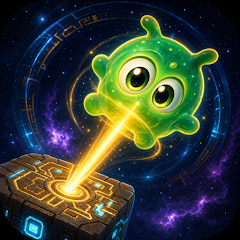
Each tile you place has a laser beam direction. Align every tile's laser so that the beams hit the glowing Nebulites hiding in the fog. Miss one, and the level does not clear. This dual condition — fill the grid and hit every target — is what separates this puzzle game from a simple block-filler. The fog mechanic adds another layer. Some cells are hidden until you place a tile near them, forcing you to remember where the Nebulites might be. It is a memory test wrapped inside a spatial puzzle.
The game runs entirely offline, which is a relief. No Wi-Fi required. No forced ads interrupting your flow. You can play this on a bus, in a basement, or anywhere else without a signal. The 2.5D visual style uses neon highlights and atmospheric lighting that makes each galaxy feel distinct. From pulsar nebulas to tactical command bridges, the environments shift as you progress through the 30+ galaxies.
How the laser-alien interaction actually works
Here is where the game gets interesting. The invisible aliens do not show up until a laser passes through their cell. You have to scan the grid with your laser paths to reveal them. The gatekeeper aliens block laser beams until you hit them from a specific angle. Fragile aliens break if the laser touches them even once, so you have to route the beam around them. The countdown aliens give you a limited number of moves before they disappear. The Boss aliens require multiple laser hits from different directions. Each alien type changes how you approach the tile placement. You cannot just fill the grid randomly.
Take a level with invisible aliens and fragile aliens together. You need to place tiles so that the laser sweeps across the invisible ones to reveal them, but you must avoid hitting the fragile ones. That means rotating tiles and adjusting the beam angles until the path is safe. This interaction between mechanics is not something you read on the Play Store description. It emerges when you actually play. The game forces you to plan several moves ahead, similar to chess but with a spatial twist.
Compared to other block puzzles, what is different
Most block puzzle games only ask you to fill a grid. Tetris, woody block games, and classic cube puzzles focus on clearing lines or fitting shapes. Star Catcher adds the laser targeting system, which turns every level into a two-step challenge. First, you place the tiles. Second, you verify the laser paths. If the beams do not hit all Nebulites, you rearrange the tiles until they do. This feedback loop is immediate. You see the laser lines, you see the targets, and you adjust.
The daily challenge mode gives you a fresh puzzle every day. These are not random levels. They are handcrafted to test specific combinations of alien types and tile shapes. Some days you get a mix of gatekeepers and countdown aliens. Other days it is invisible aliens with fragile ones. The variety keeps the game from becoming repetitive. The difficulty curve is also well-balanced. Early levels are straightforward, but by galaxy 15, you are dealing with multiple alien types on a single grid, and the fog covers half the board.
What the recent update actually changed
The developer released a patch that fixed a crash issue. The changelog also mentions a fix for Google Play game account data being accidentally cleared. That was a serious problem. Some players lost their progress after the game updated. The new version addresses that. The update also included general stability improvements, though no specific details were given about what else changed. The game now runs more smoothly on older devices, based on the improved performance reported in the patch notes.
The in-app purchase system offers hints, freeze tokens, scan abilities, and flare items. These are optional. You can complete every level without spending money. The free-to-play model is fair. No forced ads, no paywalls. The only pressure to buy comes from the difficulty of later levels, where a hint can save you from restarting a complex puzzle. But even then, the game gives you enough free tokens to get through the first 100 levels without spending a cent.
The offline reality and what that means for daily play
Because the game works offline, you do not need to worry about data usage or network drops. This is a big advantage for commuters or travelers. The daily challenges are generated locally, so you can access them even without an internet connection. The cloud save feature is only available if you are online, but the game does not force you to use it. Your progress is stored locally on your device. If you switch devices, you will need to use the cloud save or start over.
The game size is reasonable for a puzzle game with 300+ levels. The 2.5D graphics are not heavy on performance. The neon effects and atmospheric lighting are smooth, even on mid-range devices. The game does not drain the battery excessively, and it does not overheat the phone during extended play sessions. These are practical observations from playing the game across different devices.
Screenshots


Get File
App Specifications
| Latest Version | 1.0.98 |
| Uploaded by | ORBITECH PTE. LTD. |
| Requires Android | Android 7.1+ |
| Category | Trivia |
| Content Rating | Rated for 3+ |
Technical Details
| Package Name | com.guppir.starcatcher |
| Languages | * Designed for relaxed thinking, not stress |
| Architecture | arm64-v8a |
| Signature | 3ea8b66701319b61505e8894a10457d8f32c745e0163a6067413869f4019acd5 |
Security & Additional Info
| Scan Result | Secure |
| Package Name | com.guppir.starcatcher |
| SHA‑256 | 3ea8b66701319b61505e8894a10457d8f32c745e0163a6067413869f4019acd5 |
| SHA‑1 | d6f672914ef630c564ac6e592ed3a9501359dd42 |
| App Permissions | 0 |