About WhatWeather - Weather Station

The Always-On Display and the Screen Management Problem
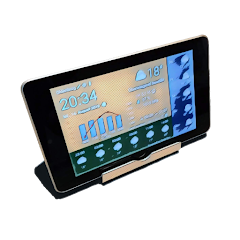
The app opens, and the screen stays on. This is the first thing you notice. It does not time out. It does not go dark. The display is always on, and the content auto-refreshes. This is the core of WhatWeather. It turns an old Android phone or tablet into a dedicated weather display. But this creates a problem. An always-on screen drains the battery. It also risks screen burn-in. The app addresses this with a screen dimming feature. You can set the display to dim or turn off after a period of inactivity. But then the display is not always on. This is a tension. The app tries to balance visibility and power consumption. The auto-refresh interval is also adjustable. The free version refreshes at a standard rate. The paid version offers more frequent updates. This is a practical limitation. If you want the screen to stay on continuously, you need to manage the power source. A plugged-in device works best. But then the device is tethered to a wall. The app does not solve the hardware problem. It only offers software workarounds. The screen management is a key feature, but it is also a source of friction. Users have to decide: always-on with a power cord, or dimmed with battery savings.
The app also includes a full-screen mode. This removes the status bar and navigation buttons. It creates a clean, focused display. The layout is designed for readability from across a room. The fonts are large. The icons are clear. But the layout is not perfect for every device. The developer admits this. The reference device is the old Google Nexus 7. The layout may not fit every screen perfectly. This is a limitation of the app's design philosophy. It prioritizes function over form. It works well on tablets. It works less well on phones. The app is a niche tool. It is not for everyone. It is for people who want to repurpose old hardware. The always-on display is the central feature. It is what makes the app useful. It is also what creates the most friction.
WhatWeather Versus a Standard Weather App
A standard weather app is designed for quick checks. You open it, you look at the forecast, you close it. The screen times out. The app does not stay open. WhatWeather is the opposite. It is designed to stay open. It is designed to be always visible. This is the key difference. A standard app is a tool. WhatWeather is a display. A standard app is optimized for battery life. WhatWeather is optimized for visibility. A standard app has a simple UI. WhatWeather has a dashboard UI. The dashboard shows everything at once: current conditions, hourly forecast, daily forecast, historical charts. It is information-dense. It is meant to be glanced at from a distance. This is a different use case. A standard app is for personal use. WhatWeather is for public display. It can be mounted on a wall. It can sit on a desk. It can be used as a kitchen display. This is the app's unique value proposition. It is not just another weather app. It is a weather display system. The integration with private weather stations is another differentiator. A standard app uses public data sources. WhatWeather can use your own weather station data. This makes it more accurate for your specific location. But it also adds complexity. You need to own a private weather station. You need to set up the integration. This is not for casual users. It is for weather enthusiasts. The app sits at the intersection of utility and hobby.
What the Changelog Actually Says
The Play Store changelog for version 1.20.1 states: "Added air quality values for MeteoSource * Bug fixes." This is the only detailed entry. Earlier versions had even less. The app's update history is sparse. The developer, Werner Kolov, does not publish extensive patch notes. This is common for utility apps. The focus is on stability and incremental improvements. The addition of air quality values is a significant update. It adds a new data layer. But it only works with MeteoSource. Users who prefer other providers do not get this feature. The "Bug fixes" entry is vague. It does not specify which bugs were fixed. This is a transparency issue. Users have reported crashes and loading issues. It is unclear if these have been addressed. The iOS version has slightly more detailed logs. It mentions "Improved app launch reliability" and "Fixed permanent error display during Netatmo service interruptions." The Android version does not have these details. This is a gap. Users on Android are left guessing. The app works, but the update process is opaque. The changelog does not inspire confidence. It is a missed opportunity for better communication.
The Netatmo Integration and the Service Interruption Error
The app supports integration with private weather stations. Netatmo is one of the supported brands. This is a powerful feature. It allows users to see their own weather data in the app. But it is not flawless. The iOS version had a bug that caused a permanent error display during Netatmo service interruptions. The error did not clear automatically. Users had to restart the app. This is a specific technical limitation. The app relies on external APIs. If the API fails, the app fails. The user experience breaks. The Android version has similar issues. The integration is useful, but it is fragile. The app does not handle API failures gracefully. It also does not provide clear error messages. This is a common problem with third-party integrations. The app is only as reliable as its data sources. If Netatmo goes down, the app goes down. The same applies to other providers. This is a structural limitation. The app cannot control external services. But it can handle errors better. The changelog suggests a fix for iOS. The Android version may still have the issue. This is a practical limitation for users who rely on private weather stations. The app is a great concept, but the execution has rough edges.
Screenshots


Get File
App Specifications
| Latest Version | 1.20.1 |
| Uploaded by | kolov.com |
| Requires Android | Varies with device |
| Category | Weather |
| Content Rating | Rated for 3+ |
Technical Details
| Package Name | com.kolov.weatherstation |
| Languages | and optional data, that you can turn on and off. Our reference is an old Google Nexus 7. We are improving the layout continuously, but it will possibly never fit your particular device perfectly. |
| Architecture | arm64-v8a |
| Signature | 4fd578c1e1c7b79c92fbb7027a0bb4e831e47be254fc9ef44fb13d65f9dffcc8 |
Security & Additional Info
| Scan Result | Secure |
| Package Name | com.kolov.weatherstation |
| SHA‑256 | 4fd578c1e1c7b79c92fbb7027a0bb4e831e47be254fc9ef44fb13d65f9dffcc8 |
| SHA‑1 | 7a6ea37bf7ee00b75cf41dd017ab71cadadbd5f8 |
| App Permissions | 0 |