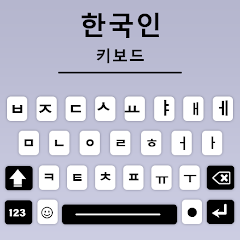
About Korean Keyboard, Type Hangul

You install the app, switch your keyboard input, and the first thing you notice is the default layout. It's a QWERTY board with Korean characters mapped onto the English keys. The space bar sits where it always does. The shift key works the same way. But then you try to type a double consonant like ㄲ or ㅃ — and nothing happens. You tap the key once, twice, three times. Still just the single character. That's the first reality check this keyboard delivers. It expects you to hold the key or tap it twice in a specific rhythm, and the app doesn't always register that rhythm correctly. The app description promises a perfect keyboard for easy typing of Korean letters and alphabet, but the moment you need a compound vowel or a double consonant, the smooth experience stumbles.
The keyboard comes from a developer based in Dera Ismail Khan, Pakistan, a detail that stands out given the app's primary audience is Korean speakers across South Korea, Japan, China, and other Asian countries. The developer, Ahsan Ullah, runs Multilingual Keyboard Apps and has built this tool for people who want to type Hangul without switching to a native Korean keyboard layout. It supports both Korean and English input, so you can write messages, emails, and social media posts in either language without changing keyboards. The bilingual setup works well for basic sentences. You type "annyeong" using the QWERTY keys mapped to Hangul, and the app converts it to 안녕. The predictive text engine kicks in after a few characters, suggesting common words and phrases. For casual messaging, it gets the job done.
But the app's real strength sits in the customization layer. You can change the keyboard theme to a BTS photo, a neon gradient, or a picture of your own. The font selection includes funny styles, iPhone-style text, and emotional typefaces. The emoji library pulls from every major platform — WhatsApp, Twitter, Bitmoji, Kaomoji, and the ever-present Kawaii cute emoticons. You can adjust the key size, the keyboard height, the click sound volume, and the vibration strength. If you prefer typing with one hand, there's a mode for that. If you want a number row always visible, you can enable it. The developer has packed a significant amount of control into the settings panel, and that level of granularity is rare for a free keyboard app.
Voice typing meets predictive text in a way you wouldn't expect
Here's where the app does something that the Play Store description doesn't fully explain. You can switch between voice typing and manual keyboard input mid-sentence without losing the predictive text context. Say you're composing a longer Korean message. You speak a few words, the voice recognition transcribes them, and the predictive engine immediately analyzes those words to suggest the next few. Then you manually type a few characters, and the predictions adjust based on both the voice input and the typed text. The app learns from both sources simultaneously. The auto-correction feature then kicks in, fixing typos and suggesting alternative spellings based on the Korean dictionary. This workflow means you don't have to commit to one input method for the entire message. You can speak half of it, type the rest, and the keyboard maintains continuity. That's not a feature listed on the Play Store page — it emerges from how the voice typing and predictive text modules interact in real usage.
Comparing a specific function with a competitor: the double vowel problem
On the standard 2-Set Korean keyboard layout (dubeolsik, 두벌식), double consonants like ㄲ, ㅃ, and ㄸ are typed by holding the key or using the shift key. On this app, you have to tap the key twice. The user review from Guadalupe Ruby in May 2021 flagged this exact issue: "The keyboard itself is okay besides the fact it doesn't include double vowels like ㅃ,ㅉ,ㄸ, etc." The developer responded, explaining that tapping twice on the button would combine the characters. But that's not how the standard Korean keyboard works on Samsung or LG devices, where you simply press and hold or use a dedicated shift key. Compared to the native Samsung keyboard, this app adds an extra step. Compared to Gboard's Korean layout, which supports both tap-and-hold and double-tap, this app feels less intuitive. Users migrating from a standard Korean keyboard will find the double-tap requirement frustrating. Some characters also change when you type them, according to another reviewer, which adds to the confusion. The swipe typing feature that users requested was eventually added, according to a developer reply in June 2026, but the core double-vowel issue remains a point of friction.
What actually changed in the version history
The Play Store page does not publish a changelog. There is no "What's New" section visible. The developer has not provided specific details about what changed in recent updates. The only version information available comes from third-party APK sites: version 1.1.7 was released on May 24, 2026, version 1.8 on June 15, 2023, and version 2.0 on February 1, 2024. The swipe typing feature, which users requested, was added in a recent update according to a developer reply in June 2026 — but the exact version number for that addition is not specified. Without a published changelog, users have no way to know whether bug fixes, performance improvements, or new features have been included. The app's data safety section states that data is encrypted in transit and that no data is collected, but the lack of version transparency makes it difficult to track what has been fixed or broken over time.
The real-world performance of the keyboard
The reviews on Chrome-Stats describe the app as useful for Hangul typing, but also warn of scam accusations, non-functionality, and startup problems caused by ads. The app is free, so ads are expected, but several users report that the ads interfere with the keyboard's functionality — either causing the app to hang or preventing it from loading properly. The keyboard adjusts its height from short to tall, and the font size changes based on portrait or landscape orientation. The one-hand mode shifts the keys to one side of the screen, which makes typing with your thumb easier on larger phones. But the ads don't respect these adjustments. They pop up over the keyboard area, covering the space bar or the prediction bar, forcing you to close them before you can continue typing. That interruption breaks the flow, especially when you're in the middle of a sentence. The key click sound and vibration feedback work consistently, though, and the glide typing feature — once added — allows you to swipe across letters to form words without lifting your finger.
Screenshots


Get File
App Specifications
| Latest Version | 1.2.0 |
| Uploaded by | Multilingual Keyboard Apps |
| Requires Android | Android 9.0+ |
| Category | Productivity |
| Content Rating | Rated for 3+ |
Technical Details
| Package Name | com.maya.newkoreankeyboard |
| Languages | English |
| Architecture | arm64-v8a |
| Signature | 5b63970201d90b536013068ae4f508abd87cf4c7aa0ee3579eb7b45a317b4cc0 |
Security & Additional Info
| Scan Result | Secure |
| Package Name | com.maya.newkoreankeyboard |
| SHA‑256 | 5b63970201d90b536013068ae4f508abd87cf4c7aa0ee3579eb7b45a317b4cc0 |
| SHA‑1 | 87c5e4fd6c51aed7ae9965afc8c9b1d03349e829 |
| App Permissions | 0 |