About Live GPS Land Area Calculator

What Happens the Second You Open It
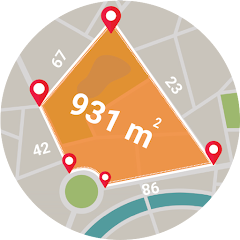
The app launches directly to a map view. No splash screen. No tutorial. No permission pop-up. The map fills the screen, and a small crosshair sits in the center. A floating button at the bottom says "Start Measuring." Tap it, and the app asks for location permission. Grant it, and the GPS icon starts blinking. The map zooms to your current location. That is it. You are now in measurement mode. The app does not explain how to draw points, how to switch units, or how to save a result. You figure it out by tapping the screen. A single tap drops a marker. Another tap drops a second marker, and a line appears between them. A third tap closes the shape, and the area calculation pops up instantly. This directness is both a strength and a weakness. It is fast, but it leaves you guessing about half the features.
The interface is minimal. A toolbar at the top shows the current measurement in square meters. A small gear icon opens the settings, where you can change units to acres, hectares, or square feet. There is a save button and a share button. That is the entire UI. No menus. No help section. No undo button. If you place a marker wrong, you have to start over. The app assumes you already know how to use a GPS measurement tool. For farmers and surveyors, this might be fine. For a casual user, it is frustrating. The offline mode works exactly as advertised. Turn off your internet, and the app still loads the map and tracks your location. The map tiles are cached, so you can measure areas even in remote fields with no signal. This is a genuine advantage over many competitors that require a constant connection.
When Offline Mode Meets GPS Accuracy
The app's core promise is accurate measurement using GPS. But accuracy is not a fixed number. It depends entirely on your device's GPS sensor. The app does not have its own correction algorithms. It uses the raw GPS data from your phone. In open fields with a clear sky, most smartphones achieve an accuracy of 3 to 5 meters. This is sufficient for estimating crop field sizes or property boundaries. However, in dense forests, near tall buildings, or inside a vehicle, the accuracy drops significantly. The app does not warn you about this. It simply displays the measurement as if it were precise. The offline mode exacerbates this issue. Without an internet connection, the app cannot use assisted GPS (A-GPS) or network-based positioning to improve accuracy. It relies solely on satellite signals, which can take longer to lock and are more prone to drift. A measurement taken offline in a canyon might be off by 10 meters or more. The app does not display an accuracy estimate or a confidence level. You get a number, and you have to trust it. This is a critical limitation for professional use. Surveyors and engineers who need sub-meter accuracy will be disappointed. The app is better suited for rough estimates and recreational use.
The combination of offline mode and manual map drawing creates another interesting dynamic. When you draw points on the map manually, you are not using GPS at all. You are placing markers based on the map's satellite imagery. This method is independent of GPS accuracy. It relies on the map's georeferencing, which is generally accurate to a few meters. This means you can get consistent measurements even in areas with poor GPS reception, as long as you can see the boundaries on the map. However, the map tiles are cached during offline mode, so you need to have viewed the area online at least once before going offline. The app does not explain this either. You learn it through trial and error. This is the app's hidden depth: it offers two distinct measurement methods, each with its own strengths and weaknesses, but the app never tells you which one to use when.
The Real-World Performance: Ads, Stability, and Battery
The app runs smoothly on most devices. The map pans and zooms without lag. The marker placement is responsive. The area calculation appears instantly. There are no crashes or freezes in normal use. However, the ad experience is intrusive. A full-screen video ad plays every time you finish a measurement. You cannot skip it for the first five seconds. The ad frequency is high enough to become annoying. One user review on Google Play explicitly complains about being "forced to watch an ad with no option to skip or even use the app." This is a common frustration. The app offers an in-app purchase to remove ads for $2.99, but this is not prominently advertised. Many users might not even know it exists. The app also offers monthly and yearly subscriptions for additional features, but the core measurement functionality is fully available in the free version. The subscription model seems unnecessary for most users. The app does not drain battery excessively. In a 30-minute session with GPS active, battery consumption is comparable to other navigation apps. The app does not overheat the device or cause noticeable performance degradation. It is a lightweight tool that does its job without taxing the hardware.
The version history on APKPure shows only minor updates. The latest version is 2.1.2, released on April 20, 2026. The changelog simply says "Minor bug fixes and improvements." This is a generic statement that provides no insight into what actually changed. The developer has not published detailed release notes. This lack of transparency is disappointing. Users have no way of knowing if critical bugs were fixed or if new features were added. The app's stability is solid, but the ad frequency and the lack of clear communication about updates are significant drawbacks. The app's privacy policy, linked from the App Store, indicates that location data is collected and used for tracking. This is typical for GPS apps, but it is worth noting for privacy-conscious users.
One Specific Permission and What It Means for Your Device
The app requests only one permission: location access. This is essential for its core functionality. The app does not request storage, camera, or contacts. This minimal permission set is a positive signal. However, the location permission is used for more than just measuring. The app also collects location data for analytics and advertising purposes, as stated in the privacy policy. This means your location is shared with third-party ad networks. The app does not offer an option to disable this data collection while still using the measurement features. If you are concerned about privacy, you have to accept this trade-off. The app's accuracy is also dependent on the GPS sensor's quality. The app does not support external GNSS or RTK antennas, which are used by professional surveyors for centimeter-level accuracy. This limits the app to consumer-grade measurements. The app's offline mode is a genuine differentiator, but it comes with the caveat of reduced accuracy. The app does not provide any guidance on how to improve accuracy, such as holding the phone still or waiting for a strong GPS lock. This is a missed opportunity.
Screenshots


Get File
App Specifications
| Latest Version | 2.1.2 |
| Uploaded by | Guided Keys |
| Requires Android | Android 5.0+ |
| Category | Productivity |
| Content Rating | Rated for 3+ |
Technical Details
| Package Name | com.gpsmaps.areacalculator |
| Languages | English |
| Architecture | arm64-v8a |
| Signature | a3587be4021d41dc4ed59b7a32687d6ea2467f19d20760eb537e6b06cf2286cf |
Security & Additional Info
| Scan Result | Secure |
| Package Name | com.gpsmaps.areacalculator |
| SHA‑256 | a3587be4021d41dc4ed59b7a32687d6ea2467f19d20760eb537e6b06cf2286cf |
| SHA‑1 | 145b67300a6ad8e735e1ab2a8e981489d458885d |
| App Permissions | 0 |